


.png)


ACCOUNT SECURITY
Log in to change your password.
Deposit or Transfer only to the accounts below
 Bank: CAIXA - 104
 Bank: INTER - 077
PIX CNPJ 60.095.119/0001-17

Warning!
You must be logged in to report a payment!
Please log in or register.
If you have any questions, contact us!
You must be logged in to report a payment!
Please log in or register.
If you have any questions, contact us!
PIX CNPJ 60.095.119/0001-17
Aviso!
You must be logged in to report a payment!
Please log in or register.
If you have any questions, contact us!
You must be logged in to report a payment!
Please log in or register.
If you have any questions, contact us!

- Inclusion: 25/06/2018 14:04:02 Exclusive Subscriber Tested WinZIP Downloaded:303Size:910MB
-
🔑 File Password Protection: Please log in as subscriber to view password!BUILD REQUEST INFO:
SW Version: osprey reteu-user 6.0.1 MPIS24.107-55-2-17 14 release-keysM8916 2020632.44.03.21.54.01R
MBM Version: 80.CF
Modem Version: M8916 2020632.44.03.21.54.01R
FSG Version: FSG-OSPREY-02.64
Build Fingerprint: motorola/osprey reteu/osprey umts:6.0.1/MPIS24.107-55-2-17/14:user/release-keys
VERSION INFO FOUND UNDER ABOUT PHONE SCREEN:
System Version: 24.226.17.osprey reteu.reteu.en.EU
Model number: Moto G Android Version: 6.0.1
Baseband Version: M8916 2020632.44.03.21.54.01R
Build Number: MPIS24.107-55-2-17
Build Date: Thu Apr 6 10:17:14 CDT 2017
OTHER MISC VERSION INFO:
Subsidy Lock Config: slcf rev b default v1.0.nvm
Regulatory Info (eLabel):
None Blur Version: Blur Version.24.226.17.osprey reteu.reteu.en.EU
Version when read from CPV: osprey reteu-user 6.0.1 MPIS24.107-55-2-17 14 release-keys


USAGE TUTORIAL AND GENERAL INFO
Este procedimento tem risco! Faça com seu risco!Esse procedimento apagará TODOS os dados do seu SMARTPHONE!FAÇA UM BACKUP DOS SEUS ARQUIVOS E CONTATOS ANTES DE INICIAR!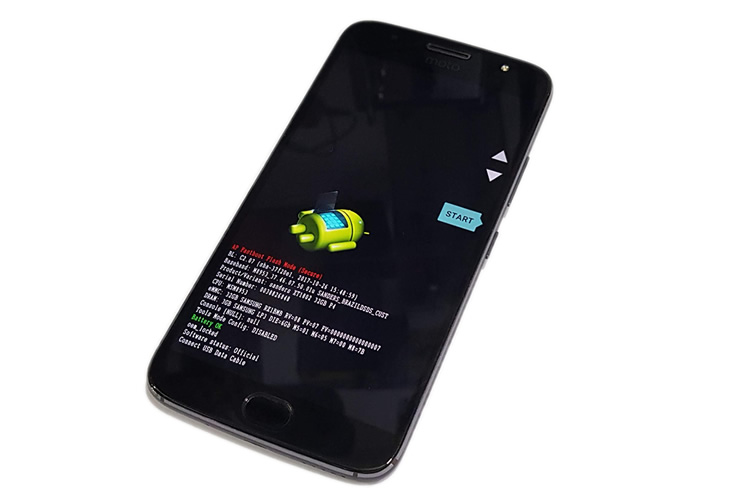 3. Agora basta conectar o celular ao computador através de um cabo USB. Se os drivers estiverem corretamente instalados, ele será automaticamente reconhecido.4. Copie os arquivos de firmware do aparelho descompactados na pasta onde foi instalada o Minimal ADB & Fastboot5. Com o celular conectado, abra onde foi instalado o Minimal ADB & Fastboot no “Prompt de comando” e execute os comandos abaixo:
Parte 1:
a) Baixando o FirmwarePrimeiramente você precisa baixar o Firmware XT1541 XT1542 XT1543 XT1544 XT1550 DE ACORDO COM SEU APARELHOImportante: Utilize a versão mais atual possívelb) Baixando os Drivers
Em seguida você vai precisar instalar os drivers para seu Moto Gc) Baixando o Fastboot
Agora baixe e instale o “ Minimal ADB & Fastboot”IMPORTANTE! BATERIA 100% CARREGADA, SE O CELULAR DESLIGAR DURANTE O PROCESSO VOCÊ PODE PERDER O APARELHO!Parte 2: Instalando
1. Com tudo instalado, vamos iniciar o processo.2. Desligue o aparelho, agora segure os botões volume para baixo [VOLUME -] e Ligar [POWER] por cerca de 5 segundos. Agora solte o botão Ligar [POWER] irá aparecer a tela abaixo:3. Agora basta conectar o celular ao computador através de um cabo USB. Se os drivers estiverem corretamente instalados, ele será automaticamente reconhecido.4. Copie os arquivos de firmware do aparelho descompactados na pasta onde foi instalada o Minimal ADB & Fastboot5. Com o celular conectado, abra onde foi instalado o Minimal ADB & Fastboot no “Prompt de comando” e execute os comandos abaixo:fastboot devicesfastboot flash partition gpt.binfastboot flash bootloader bootloader.imgfastboot flash logo logo.binfastboot flash boot boot.imgfastboot flash recovery recovery.imgfastboot flash system system.img_sparsechunk.0fastboot flash system system.img_sparsechunk.1fastboot flash system system.img_sparsechunk.2fastboot flash system system.img_sparsechunk.3fastboot flash system system.img_sparsechunk.4fastboot flash system system.img_sparsechunk.5fastboot flash system system.img_sparsechunk.6fastboot flash modem NON-HLOS.binfastboot erase modemst1fastboot erase modemst2fastboot flash fsg fsg.mbnfastboot erase cachefastboot erase userdatafastboot erase customizefastboot reboot
