


.png)


SICUREZZA ACCOUNT
Accedi per cambiare la password.
Deposito o Bonifico solo sui conti sottostanti
 Banca: CAIXA - 104
 Banca: INTER - 077
PIX CNPJ 60.095.119/0001-17

Avviso!
Devi accedere per segnalare un pagamento!
Per favore, accedi o registrati.
Se hai domande, contattaci!
Devi accedere per segnalare un pagamento!
Per favore, accedi o registrati.
Se hai domande, contattaci!
PIX CNPJ 60.095.119/0001-17
Aviso!
Devi accedere per segnalare un pagamento!
Per favore, accedi o registrati.
Se hai domande, contattaci!
Devi accedere per segnalare un pagamento!
Per favore, accedi o registrati.
Se hai domande, contattaci!

- Inclusione: 26/07/2018 15:58:16 Abbonato Esclusivo Testato 7zip v20.00 Scaricato:171Dimensione:1,42GB
-
🔑 Password Protezione File: Fai il login come abbonato per visualizzare la password!BUILD REQUEST INFO:
SW Version: sanders-user 7.1.1 NPSS26.116-64-11 13 release-keysM8953 37.46.07.50.01R
MBM Version: C2.07
Modem Version: M8953 37.46.07.50.01R
FSG Version: FSG-8953-09.63
Build Fingerprint: motorola/sanders/sanders:7.1.1/NPSS26.116-64-11/13:user/release-keys
CQATest App Version: 5.1.0
VERSION INFO FOUND UNDER ABOUT PHONE SCREEN:
System Version: 26.371.13.sanders.retail.en.US
Model Number: Moto G (5S) Plus
Android Version: 7.1.1
Baseband Version: M8953 37.46.07.50.01R Build Id: NPSS26.116-64-11
SW Display Build ID: NPSS26.116-64-11
Build Date: Tue May 29 21:03:18 CDT 2018
OTHER MISC VERSION INFO:
Subsidy Lock Config: slcf rev d default v1.0.nvm
Regulatory Info (eLabel): regulatory info default.png
Blur Version: Blur Version.26.371.13.sanders.retail.en.US
Version when read from CPV: sanders-user 7.1.1 NPSS26.116-64-11 13 release-keys
AB Update Enabled: False
Full Treble Enabled: False


TUTORIAL DI UTILIZZO E INFORMAZIONI GENERALI
Este procedimento tem risco! Faça com seu risco!Esse procedimento apagará TODOS os dados do seu SMARTPHONE!FAÇA UM BACKUP DOS SEUS ARQUIVOS E CONTATOS ANTES DE INICIAR!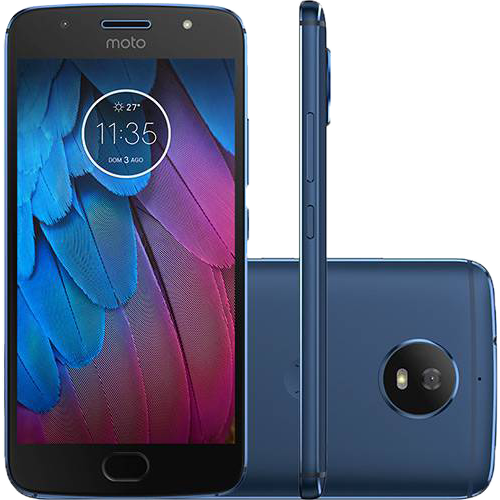
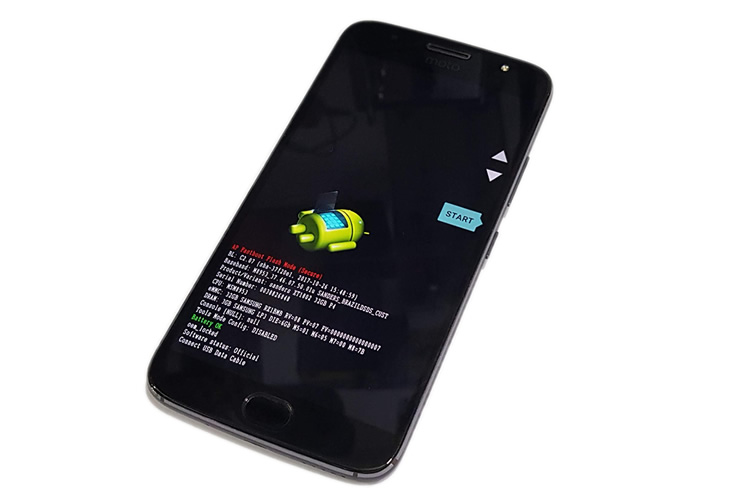 3. Agora basta conectar o celular ao computador através de um cabo USB. Se os drivers estiverem corretamente instalados, ele será automaticamente reconhecido.4. Copie os arquivos de firmware do aparelho descompactados na pasta onde foi instalada o Minimal ADB & Fastboot5. Com o celular conectado, abra onde foi instalado o Minimal ADB & Fastboot no “Prompt de comando” e execute os comandos abaixo:
Parte 1:
a) Baixando o FirmwarePrimeiramente você precisa baixar o Firmware XT1802Importante: Utilize a versão mais atual possívelb) Baixando os Drivers
Em seguida você vai precisar instalar os drivers para seu Moto Gc) Baixando o Fastboot
Agora baixe e instale o “ Minimal ADB & Fastboot”IMPORTANTE! BATERIA 100% CARREGADA, SE O CELULAR DESLIGAR DURANTE O PROCESSO VOCÊ PODE PERDER O APARELHO!Parte 2: Instalando
1. Com tudo instalado, vamos iniciar o processo.2. Desligue o aparelho, agora segure os botões volume para baixo [VOLUME -] e Ligar [POWER] por cerca de 5 segundos. Agora solte o botão Ligar [POWER] irá aparecer a tela abaixo:3. Agora basta conectar o celular ao computador através de um cabo USB. Se os drivers estiverem corretamente instalados, ele será automaticamente reconhecido.4. Copie os arquivos de firmware do aparelho descompactados na pasta onde foi instalada o Minimal ADB & Fastboot5. Com o celular conectado, abra onde foi instalado o Minimal ADB & Fastboot no “Prompt de comando” e execute os comandos abaixo:fastboot oem fb_mode_setfastboot flash partition gpt.binfastboot flash bootloader bootloader.imgfastboot flash logo logo.binfastboot flash boot boot.imgfastboot flash recovery recovery.imgfastboot flash dsp adspso.binfastboot flash oem oem.imgfastboot flash system system.img_sparsechunk.0fastboot flash system system.img_sparsechunk.1fastboot flash system system.img_sparsechunk.2fastboot flash system system.img_sparsechunk.3fastboot flash system system.img_sparsechunk.4fastboot flash system system.img_sparsechunk.5fastboot flash system system.img_sparsechunk.6fastboot flash modem NON-HLOS.binfastboot erase modemst1 fastboot erase modemst2 fastboot flash fsg fsg.mbnfastboot erase cache fastboot erase userdata fastboot erase customizefastboot erase clogofastboot oem fb_mode_clearfastboot oem lockfastboot oem lockfastboot flash oem oem.imgfastboot flash system system.img_sparsechunk.0fastboot flash system system.img_sparsechunk.1fastboot flash system system.img_sparsechunk.2fastboot flash system system.img_sparsechunk.3fastboot flash system system.img_sparsechunk.4fastboot flash system system.img_sparsechunk.5fastboot flash system system.img_sparsechunk.6fastboot flash boot boot.imgfastboot oem lock
